What Is DMARC and Why Should You Care?
<h3>Introduction</h3><p>Your domain name is one of your most valuable digital assets. It's how customers find your website and—critically—how they recognize emails from you. But without proper email authentication, anyone can send emails that appear to come from your domain. This is called email spoofing, and it's one of the most common attack vectors used in phishing campaigns.</p><p>DMARC (Domain-based Message Authentication, Reporting, and Conformance) is the standard that puts you back in control. It builds on two older protocols—SPF and DKIM—to let you tell receiving mail servers exactly what to do when an email fails authentication checks. Without DMARC, you're leaving your domain, your brand, and your customers exposed.</p>
What DMARC Actually Does
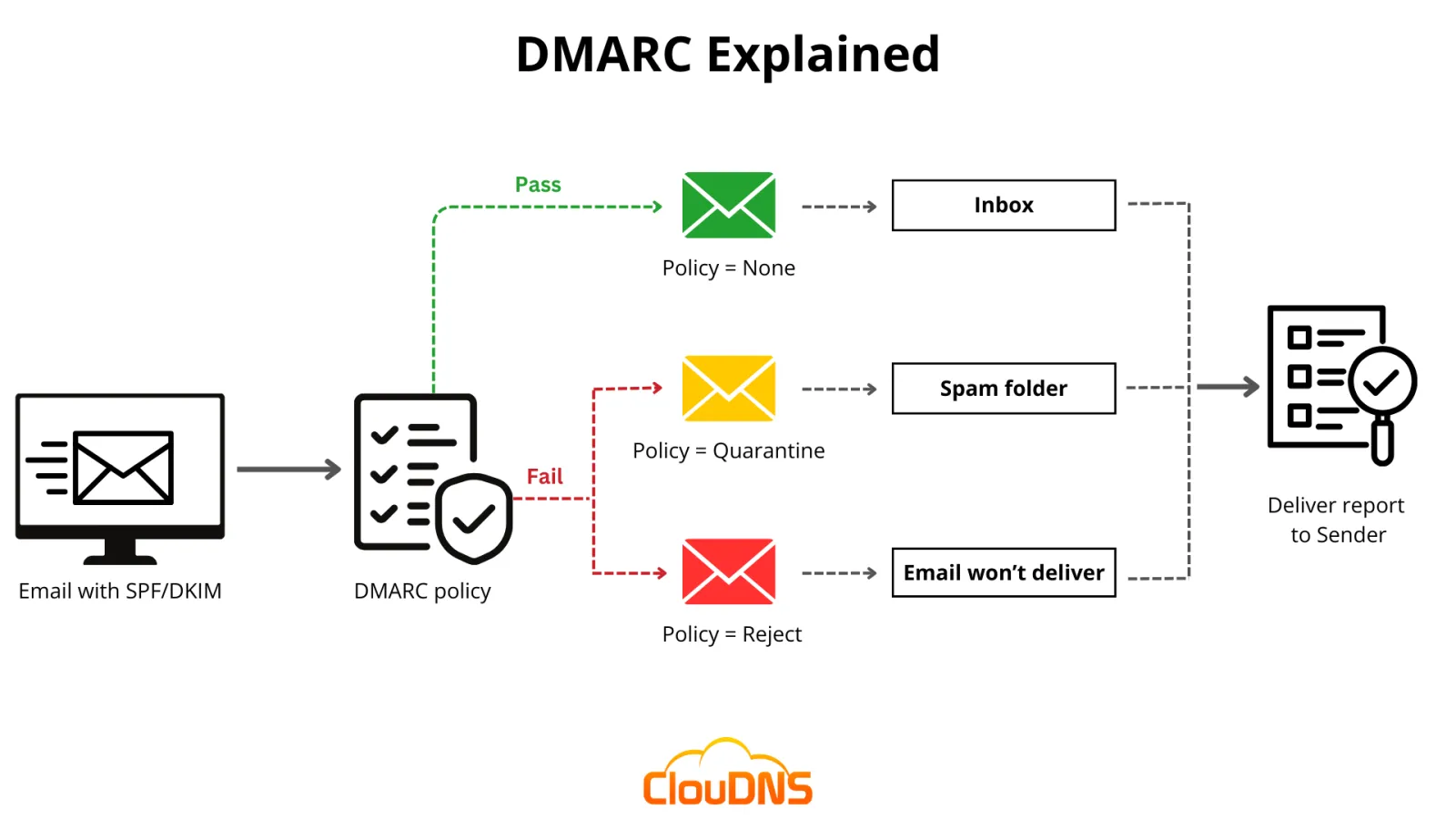
DMARC solves three problems at once. First, it lets you publish a policy that tells receiving mail servers how to handle unauthenticated email from your domain: do nothing, quarantine it, or reject it outright. Second, it provides reporting so you can see who is sending email on your behalf—legitimate or otherwise. Third, it gives you visibility into your own email infrastructure so you can fix configuration problems before they affect deliverability.
Think of DMARC as the rulebook you hand to every email server on the planet. When a server receives an email claiming to be from @yourdomain.com, it checks your DMARC record to see what to do. If the email passes SPF and DKIM checks, it delivers normally. If it fails, the server follows your instructions—and if you've set your policy to p=reject, that spoofed email never reaches the recipient's inbox.
The Relationship Between SPF, DKIM, and DMARC
DMARC doesn't work alone. It relies on SPF (Sender Policy Framework) and DKIM (DomainKeys Identified Mail) to do the actual authentication.
SPF checks whether the sending server's IP address is authorized to send mail for your domain. You publish a list of approved IPs in your DNS, and receiving servers compare the sender's IP against that list. DKIM adds a cryptographic signature to each outgoing email, which receiving servers verify against a public key you publish in DNS.
DMARC ties these together by requiring that either SPF or DKIM passes—and that the domain in the From: header aligns with the domain that passed the check. This alignment requirement is what makes DMARC so effective: even if an attacker passes SPF from a different domain, DMARC will catch the mismatch.
Setting Up DMARC Step by Step
Getting started with DMARC is straightforward and doesn't require any special software.
Step 1: Ensure SPF and DKIM are configured. Before you publish a DMARC record, make sure SPF and DKIM are working for all services that send email on your behalf. This includes your email provider, your CRM, your marketing platform, and any transactional email services.
Step 2: Publish a monitoring-only policy. Start with p=none so you can collect reports without affecting email delivery. Your DMARC record would look like this:
_dmarc.yourdomain.com TXT "v=DMARC1; p=none; rua=mailto:[email protected]"
Step 3: Analyze the reports. DMARC aggregate reports (sent as XML files) show you which IPs are sending email for your domain, how much passes authentication, and how much fails. Use a DMARC report analyzer or a dedicated service to make sense of this data.
Step 4: Fix authentication failures. The reports will reveal legitimate services you forgot to include in SPF or that aren't signing with DKIM. Fix those gaps.
Step 5: Escalate your policy. Once you're confident all legitimate email passes authentication, move to p=quarantine (sends failures to spam) and eventually p=reject (blocks failures entirely).
Real-World Impact
Organizations that implement DMARC at p=reject eliminate direct domain spoofing. This means phishing emails that appear to come from your domain—the kind that trick customers into handing over passwords or payment details—simply stop reaching inboxes.
Beyond security, DMARC improves email deliverability. Major providers like Gmail and Microsoft prioritize authenticated email. Domains with a strong DMARC policy are less likely to land in spam folders. In 2024, Google and Yahoo both began requiring DMARC for bulk senders, making it effectively mandatory for any business that sends more than 5,000 emails per day.
How ScanSentinel Helps
ScanSentinel automatically checks your domain's DMARC configuration as part of its email security scans. The platform verifies that your DMARC record is present, correctly formatted, and using an appropriate policy. It also checks that SPF and DKIM records are properly configured, giving you a complete picture of your email authentication posture.
If your DMARC record is missing or misconfigured, ScanSentinel flags it and provides clear remediation steps. For ScanSentinel users, the Email Authentication report shows all three protocols side by side, so you can see exactly what needs attention.