Understanding SSL/TLS Configuration: Certificates, Protocols, and Ciphers
<h3>Table of Contents</h3><p><a href="#introduction">Introduction</a></p><p><a href="#ssl-vs-tls-whats-the-difference">SSL vs TLS: What's the Difference?</a></p><p><a href="#how-tls-certificates-work">How TLS Certificates Work</a></p><p><a href="#tls-protocol-versions-explained">TLS Protocol Versions Explained</a></p><p><a href="#weak-ciphers-and-why-theyre-dangerous">Weak Ciphers and Why They're Dangerous</a></p><p><a href="#common-tls-misconfigurations">Common TLS Misconfigurations</a></p><p><a href="#how-scansentinels-ssltls-scanner-works">How ScanSentinel's SSL/TLS Scanner Works</a></p><p><a href="#actionable-recommendations">Actionable Recommendations</a></p><p><a href="#try-scansentinel">Try ScanSentinel</a></p>
Introduction
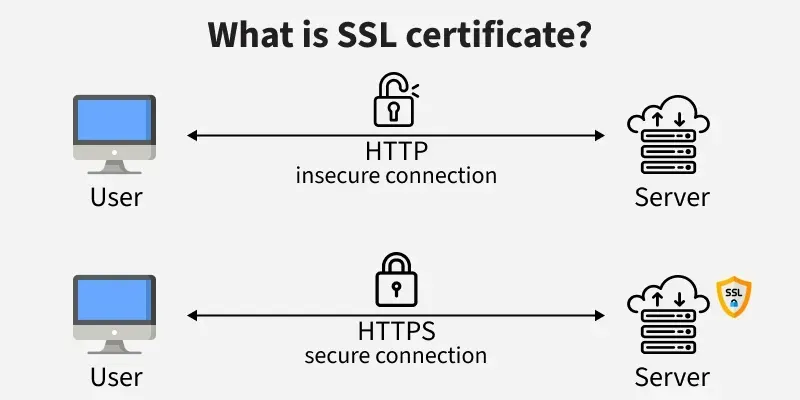
That padlock icon in your browser's address bar represents the most widely deployed cryptographic system on the planet. TLS (Transport Layer Security) encrypts the connection between your visitors and your server, ensuring that passwords, credit card numbers, and personal data can't be read by anyone in between.
But the padlock can be misleading. A site can show a padlock — indicating the connection is encrypted — while using a dangerously outdated protocol version or accepting cipher suites that can be broken in seconds. The padlock means encryption is happening. It doesn't mean the encryption is good.
In our scans at ScanSentinel, we find that roughly 15 to 20 percent of domains still support TLS 1.0, which was deprecated in 2018 and formally prohibited by the IETF in 2021. A similar percentage accept weak cipher suites including RC4, DES, 3DES, and EXPORT-grade ciphers. These aren't obscure edge cases — they're production servers handling real traffic.
This article explains how TLS works, what the different protocol versions mean, which ciphers are weak and why, and how ScanSentinel's scanners detect these issues so you can fix them before they become a problem.
SSL vs TLS: What's the Difference?
SSL (Secure Sockets Layer) was the original encryption protocol for the web, developed by Netscape in the mid-1990s. SSL 2.0 was released in 1995 and was found to contain serious security flaws almost immediately. SSL 3.0 replaced it in 1996 and was the standard for several years — until the POODLE attack in 2014 rendered it definitively insecure.
TLS (Transport Layer Security) is the successor to SSL. TLS 1.0, released in 1999, was essentially SSL 3.1 with a new name and incremental improvements. Each subsequent version — TLS 1.1 (2006), TLS 1.2 (2008), and TLS 1.3 (2018) — has tightened the protocol, removed weak algorithms, and improved performance.
Today, "SSL" is a colloquial term. When someone says "SSL certificate," they mean a TLS certificate. When they say "SSL encryption," they mean TLS. The industry hasn't fully moved on from the older name, but the technology has. Everything production-facing should be running TLS 1.2 or TLS 1.3.
Here's the practical timeline:
SSL 2.0: 1995
SSL 3.0: 1996
TLS 1.0: 1999
TLS 1.1: 2006
TLS 1.2: 2008
TLS 1.3: 2018
If your server supports SSL 2.0, SSL 3.0, TLS 1.0, or TLS 1.1 — and a significant number still do — you have a problem.
How TLS Certificates Work
A TLS certificate serves two purposes: encryption and identity.
Encryption
When a browser connects to your server, they perform a TLS handshake. The server sends its certificate, which contains a public key. The browser generates a session key, encrypts it with the server's public key, and sends it back. Only the server — which holds the corresponding private key — can decrypt it. From that point, both sides use the session key for symmetric encryption, which is fast and secure.
Identity
The certificate also proves that the server is who it claims to be. This is the chain of trust. Your certificate is signed by a Certificate Authority (CA) — an organisation like Let's Encrypt, DigiCert, or Sectigo whose root certificate is pre-installed in every browser and operating system. When the browser receives your certificate, it follows the chain: your certificate was signed by an intermediate CA, which was signed by a root CA, which is in the browser's trust store. If any link in this chain is broken — an expired intermediate certificate, a missing issuer, or a self-signed certificate without a trusted chain — the browser shows a security warning.
Expiry and Renewal
Certificates have a finite lifetime. Let's Encrypt certs are valid for 90 days. Commercially issued certificates typically last one year. The industry has been moving toward shorter lifetimes because shorter validity periods reduce the window of exposure if a private key is compromised. Apple's Safari browser now requires certificates issued after September 2020 to be valid for no more than 398 days.
When a certificate expires, browsers block access to the site with a full-page interstitial warning. This is not a soft warning users can click through — most modern browsers make it difficult or impossible to bypass. An expired certificate means your site is effectively offline.
ScanSentinel checks certificate validity and tracks the remaining validity period. We alert you when a certificate has fewer than 30 days remaining, giving you time to renew before it expires.
TLS Protocol Versions Explained
TLS 1.0 and 1.1: The Deprecated Generation
TLS 1.0 was released in 1999 and relies on cryptographic primitives that are now considered weak. It supports cipher suites using MD5 and SHA-1 for message authentication — both of which are broken. It lacks support for modern authenticated encryption modes (AEAD), meaning it must use separate encryption and MAC algorithms in a pattern (MAC-then-encrypt) that has been exploited in practice.
The POODLE attack (Padding Oracle On Downgraded Legacy Encryption) exploited a design flaw in how SSL 3.0 handled block cipher padding. TLS 1.0 inherited the same vulnerability. The BEAST attack (Browser Exploit Against SSL/TLS) targeted a weakness in TLS 1.0's CBC (Cipher Block Chaining) mode implementation. Both are real, practical attacks that have been demonstrated in the wild.
The PCI Security Standards Council prohibited the use of TLS 1.0 for payment card data from June 2018. The IETF formally deprecated TLS 1.0 and TLS 1.1 in March 2021 (RFC 8996). Major browsers — Chrome, Firefox, Safari, Edge — have removed support or show warnings for sites using these versions.
If your server still supports TLS 1.0 or TLS 1.1, every connection to it is potentially vulnerable to protocol downgrade attacks.
TLS 1.2: The Current Baseline
TLS 1.2, released in 2008, is the minimum acceptable version for any production service. It introduced support for AEAD cipher suites (like AES-GCM), replaced the broken MD5/SHA-1 combination with SHA-256 in the pseudorandom function, and allowed the client and server to negotiate which hash and signature algorithms to use.
Most of the internet runs on TLS 1.2 today. It's well-supported, well-understood, and secure — provided the cipher suite configuration excludes weak algorithms. It does, however, have a slower handshake than TLS 1.3, requiring two round-trips compared to one.
TLS 1.3: The Modern Standard
TLS 1.3, published in 2018, is a significant redesign. It removes everything that had been broken over the previous two decades:
Removed support for all static RSA and Diffie-Hellman key exchange mechanisms
Removed all CBC-mode cipher suites (which were vulnerable to padding oracle attacks)
Removed RC4, DES, 3DES, and EXPORT ciphers entirely
Removed MD5 and SHA-1 from the handshake
Reduced the handshake to a single round-trip (or zero round-trips for resumed sessions)
Encrypted a larger portion of the handshake, including the server certificate
The result is a protocol that is both faster and more secure. TLS 1.3 connections establish in roughly half the time of TLS 1.2 connections and eliminate entire classes of attack. Every modern web server supports TLS 1.3, and every domain that can should enable it.
Weak Ciphers and Why They're Dangerous
A cipher suite is a named combination of algorithms that a TLS connection uses: key exchange, authentication, encryption, and message authentication. The server and client negotiate which suite to use during the handshake. If the server offers weak cipher suites, a determined attacker can force the connection to downgrade to one of them.
Here are the weak cipher classes that ScanSentinel checks for:
RC4
RC4 is a stream cipher designed in 1987 by Ron Rivest. For years, it was the most widely used cipher on the web. Then researchers discovered statistical biases in its output — patterns that could be exploited to recover plaintext from encrypted traffic. The attack was practical: researchers demonstrated recovery of HTTP session cookies encrypted with RC4 in approximately 75 hours of passive network observation. RC4 was prohibited by RFC 7465 in 2015.
DES and 3DES
DES (Data Encryption Standard) uses a 56-bit key, which can be brute-forced in hours with consumer hardware. 3DES (Triple DES) applies DES three times with different keys, giving an effective key length of 112 bits — stronger, but still considered inadequate for modern applications. 3DES also suffers from the Sweet32 birthday attack, which can recover plaintext from long-lived encrypted connections. Both are deprecated.
EXPORT-Grade Ciphers
In the 1990s, US export regulations restricted the strength of encryption software that could be shipped overseas. "EXPORT" ciphers were deliberately weakened versions with 40-bit or 56-bit key lengths. The regulations were lifted in 2000, but the cipher suites persisted in TLS implementations for backwards compatibility. The FREAK and Logjam attacks (2015) demonstrated that these deliberately weakened ciphers could be exploited to break TLS connections on modern servers that still supported them.
NULL Ciphers
NULL cipher suites provide no encryption at all. They exist for debugging purposes. They should never be enabled on a production server. If your server accepts NULL ciphers, it will happily establish a "secure" connection that transmits everything in plain text.
MD5
MD5 is a hash function used in older cipher suites for message authentication. It's cryptographically broken — researchers can generate two different inputs that produce the same MD5 hash, a property called collision. It was deprecated for TLS use in 2008. Any cipher suite that includes MD5 should be considered insecure.
ScanSentinel attempts connections using each of these cipher classes and reports which ones the server accepts. Our scanner also checks the default negotiated cipher — the cipher your server picks when a client doesn't specify a preference — and flags it if it's weak.
Common TLS Misconfigurations
Beyond protocol versions and cipher suites, we see several recurring misconfigurations in production environments:
Expired Certificates
The most common — and most avoidable — TLS failure. Automated renewal with Let's Encrypt or a managed cloud certificate service is free and low-effort. The failure is almost always in the automation, not the certificate issuer. Renewal scripts fail silently. Cloud load balancer certificate assignments change during deployments. Someone renews the certificate on the origin server but forgets to upload it to the CDN.
Incomplete Certificate Chains
The server sends its certificate but omits one or more intermediate certificates. Some browsers can "fill in the gap" by downloading missing intermediates, but others — particularly mobile browsers and API clients — cannot. The result is a certificate error for a subset of users, which is often difficult to reproduce and diagnose.
Mismatched Domains
The certificate covers example.com, but the user is visiting www.example.com (or vice versa). This is a configuration issue: either the certificate doesn't include both names as Subject Alternative Names (SANs), or the server is redirecting between the bare domain and the www subdomain in a way that triggers a certificate mismatch.
Wildcard Certificates Used Broadly
A wildcard certificate for *.example.com is convenient but risky. If the private key is compromised — from any server using that certificate — every subdomain is affected. Best practice is to limit wildcard certificates to environments where you have no alternative (e.g., dynamically provisioned subdomains) and use single-domain certificates or managed certificates for everything else.
Old TLS Versions Enabled for "Compatibility"
The most common justification for keeping TLS 1.0 enabled is legacy client support — old Android devices, outdated point-of-sale terminals, legacy APIs. The fix is to move those clients onto modern TLS or isolate them behind a dedicated endpoint, not to weaken encryption for everyone else. If your legacy clients can't be updated and represent a meaningful portion of your traffic, serve them from a separate hostname with restricted access, keeping your main site on TLS 1.2+.
How ScanSentinel's SSL/TLS Scanner Works
ScanSentinel runs two distinct TLS scans for every monitored domain:
SSL Certificate Check
Establishes a TLS connection to the domain on port 443 with full certificate validation (rejectUnauthorized: true).
Retrieves the peer certificate from the server.
Validates the certificate chain — is it signed by a trusted CA? Is the certificate itself expired?
Extracts the issuer, subject (Common Name), valid-from date, and valid-to date.
Calculates the number of days remaining until expiry.
Reports an error if the certificate is invalid, expired, unreachable, or if the connection failed due to a certificate-specific error code.
TLS Configuration Check
Protocol version audit: Attempts four separate connections, each pinned to a specific TLS version — TLS 1.0, TLS 1.1, TLS 1.2, and TLS 1.3. If a connection succeeds, that version is supported by the server.
Default cipher check: Establishes a standard connection and inspects the negotiated cipher suite. If the default cipher name matches any known weak pattern, it's flagged.
Weak cipher probe: For each weak cipher class (RC4, DES, 3DES, MD5, EXPORT, NULL, aNULL, eNULL, LOW, IDEA, SEED), the scanner attempts a TLS 1.2 connection restricted to that cipher class. If the connection succeeds, the server accepts that weak cipher.
Both scans run as part of every domain check (or on the specific schedule configured for your plan). Results are incorporated into the domain's overall security score and reported as actionable findings.
Actionable Recommendations
Audit your TLS configuration today. Use an automated scanner — like ScanSentinel — to check which protocol versions and cipher suites your server supports. Manual inspection of configuration files is a good start, but the only reliable test is what the server actually negotiates over the wire.
Disable TLS 1.0 and TLS 1.1. For Nginx: ssl_protocols TLSv1.2 TLSv1.3;. For Apache: SSLProtocol -all +TLSv1.2 +TLSv1.3. For cloud load balancers and CDNs, check the security policy settings in your provider's console.
Restrict your cipher suites. Configure an explicit cipher list rather than relying on defaults:
Nginx:
ssl_ciphers 'ECDHE-ECDSA-AES256-GCM-SHA384:ECDHE-RSA-AES256-GCM-SHA384:ECDHE-ECDSA-CHACHA20-POLY1305:ECDHE-RSA-CHACHA20-POLY1305:ECDHE-ECDSA-AES128-GCM-SHA256:ECDHE-RSA-AES128-GCM-SHA256';ssl_prefer_server_ciphers on;
This list includes only AEAD cipher suites with forward secrecy — no RC4, no DES, no CBC-mode suites.
Enable TLS 1.3. Most modern web servers and CDNs support it. For Nginx 1.13+, just add TLSv1.3 to the ssl_protocols directive. For Apache 2.4.36+, the same syntax applies. TLS 1.3 eliminates entire categories of attack and speeds up handshakes — there is no downside.
Automate certificate renewal. If you're using Let's Encrypt, configure Certbot or your ACME client as a cron job or systemd timer. If you're using a cloud provider's managed certificates, verify that auto-renewal is actually enabled. If you're buying certificates manually, set calendar reminders at 45, 30, and 14 days before expiry.
Monitor continuously. Certificates have a habit of expiring at the worst possible moment — holidays, weekends, product launches. Set up automated monitoring that alerts you weeks before expiry. ScanSentinel sends email and webhook alerts when certificates approach their expiration date, so you're never caught off guard.
Try ScanSentinel
SSL and TLS misconfigurations are invisible to most of your users — until they aren't. When a certificate expires or a weak cipher is exploited, the damage to user trust and business operations happens fast.
ScanSentinel scans your domain's SSL certificate and TLS configuration in seconds, giving you a clear picture of what needs attention — from expiring certificates to dangerously outdated protocol support.