Understanding DNSSEC
<h3>Introduction</h3><p>DNS was designed in the 1980s, and security wasn't part of the original specification. When your browser asks a DNS resolver "what's the IP for <code>yourbank.com</code>?", there's nothing in basic DNS to prove the answer is genuine. An attacker who can intercept or poison DNS responses can redirect you to a convincing fake site without any visible warning.</p><p>DNSSEC (Domain Name System Security Extensions) closes this gap. It adds cryptographic signatures to DNS records, creating a chain of trust from the DNS root zone down to your individual domain. When DNSSEC is properly configured, resolvers can verify that the DNS response they received is exactly what the domain owner published—not a forgery.</p>
Understanding DNSSEC
Introduction
DNS was designed in the 1980s, and security wasn't part of the original specification. When your browser asks a DNS resolver "what's the IP for yourbank.com?", there's nothing in basic DNS to prove the answer is genuine. An attacker who can intercept or poison DNS responses can redirect you to a convincing fake site without any visible warning.
DNSSEC (Domain Name System Security Extensions) closes this gap. It adds cryptographic signatures to DNS records, creating a chain of trust from the DNS root zone down to your individual domain. When DNSSEC is properly configured, resolvers can verify that the DNS response they received is exactly what the domain owner published—not a forgery.
The Problem DNSSEC Solves
Standard DNS is vulnerable to a class of attacks called DNS cache poisoning. In a cache poisoning attack, the attacker sends forged DNS responses that trick a recursive resolver into caching incorrect data. Once poisoned, the resolver feeds the wrong IP address to every user who queries it—potentially for hours or days, until the TTL expires.
Cache poisoning was famously demonstrated by Dan Kaminsky in 2008, who showed that the 16-bit transaction ID in DNS queries provided only about 32,000 possible values—trivially brute-forced on modern networks. The short-term fix was source port randomization, which increased the entropy. The long-term fix is DNSSEC.
DNSSEC doesn't encrypt DNS queries (DNS over HTTPS and DNS over TLS handle that). Instead, it guarantees authenticity and integrity: the data you receive is genuinely from the domain owner and hasn't been tampered with.
How the Chain of Trust Works
DNSSEC establishes a hierarchical chain of trust starting from the DNS root zone:
Root zone. The root zone's DNSKEY record is signed by itself and is universally trusted. This is the trust anchor. The root zone signs DS (Delegation Signer) records for each TLD.
TLD zone. The .com zone has its own DNSKEY, signed by the root's key. The .com zone signs DS records for every DNSSEC-enabled .com domain.
Your domain. You generate a ZSK (Zone Signing Key) and a KSK (Key Signing Key). The ZSK signs your individual DNS records. The KSK signs the ZSK. You send a DS record (a hash of your KSK) to your registrar, which publishes it in the TLD zone.
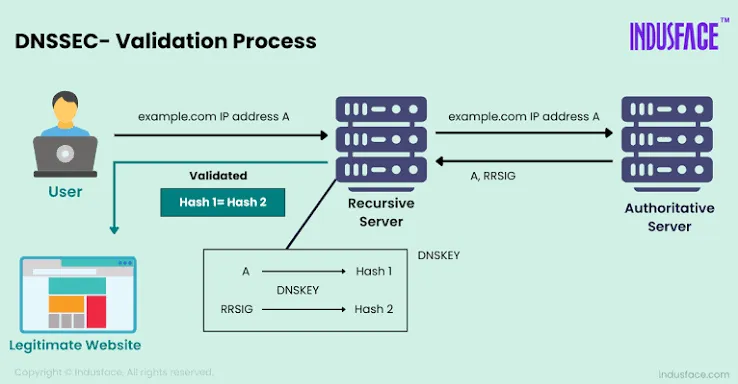
When a DNSSEC-validating resolver queries your domain, it follows this chain:
Trust the root's key (hardcoded).
Verify the TLD's DS record with the root's key.
Verify your DS record with the TLD's key.
Verify your DNSKEY with your DS record.
Verify your RRSIG (record signatures) with your DNSKEY.
If any link fails, the resolver returns a SERVFAIL error and the record is not returned to the client—preventing the poisoned data from ever reaching an application.
Key Types and Record Types
Understanding the records DNSSEC introduces helps you troubleshoot issues:
DNSKEY. Contains the public keys for your zone. There are usually two: the KSK (flag 257) and the ZSK (flag 256).
RRSIG. The cryptographic signature of a specific DNS record set. Every record type you have (A, MX, TXT, etc.) gets an RRSIG.
DS. Delegation Signer record. A hash of your KSK, stored in the parent zone. This is what you give to your registrar.
NSEC and NSEC3. Prove that a requested record doesn't exist. Without these, an attacker could forge a "no such record" response. NSEC3 adds hashing to prevent zone walking (enumerating all records in a zone).
Enabling DNSSEC for Your Domain
Step 1: Check registrar support. Not all registrars support DNSSEC. Verify that yours accepts DS records. Most major registrars (Namecheap, Cloudflare, Google Domains, AWS Route 53) do.
Step 2: Generate keys. How you do this depends on your DNS host:
Cloudflare: Enable DNSSEC with one click. Cloudflare generates keys, signs records, and provides DS records automatically.
Route 53: Use the AWS console to create a KSK, then get the DS record from the console.
Self-hosted DNS (BIND, PowerDNS): Use dnssec-keygen to generate keys, add them to your zone file, sign the zone with dnssec-signzone, and configure automatic re-signing via cron.
Step 3: Publish the DS record. Copy the DS record values (key tag, algorithm, digest type, and digest) to your registrar's DNSSEC management interface. This is a manual step—your registrar doesn't do it automatically.
Step 4: Validate. Use a DNSSEC validation tool like DNSViz or Verisign's DNSSEC Debugger to verify the chain of trust is complete. Test your domain with delv @resolver yourdomain.com to simulate a validating resolver.
Step 5: Monitor. DNSSEC requires ongoing maintenance. Signatures expire and must be re-signed. Keys should be rotated periodically. If your DNS host handles this automatically, confirm that it's working. If you're self-hosting, set up monitoring and automated re-signing.
Common DNSSEC Pitfalls
Expired signatures. RRSIG records have an expiration date. If your zone isn't re-signed in time, validating resolvers will reject all your records. Your site effectively disappears for anyone using DNSSEC-validating resolvers.
Key rollover failures. When rotating keys, you must follow a precise sequence (usually a double-signature method). Getting it wrong breaks the chain of trust.
NSEC3 misconfiguration. Incorrect NSEC3 parameters can cause valid negative responses to fail validation. This is rare with managed DNS providers but common with self-hosted setups.
MTU issues. DNSSEC responses are larger than standard DNS responses. If your firewall or network path blocks UDP DNS packets larger than 512 bytes, DNSSEC queries may fail. Ensure TCP port 53 and EDNS0 (extension mechanisms for DNS) are allowed.
How ScanSentinel Helps
ScanSentinel's DNS scanner checks whether DNSSEC is enabled for your domain and validates the chain of trust from root to your zone. It detects expired RRSIG signatures, missing DS records, and key misconfigurations. The platform monitors your DNSSEC configuration over time and alerts you before signatures expire.
For domains without DNSSEC, ScanSentinel provides a step-by-step enablement guide tailored to your DNS provider. The DNS security dashboard shows your DNSSEC status alongside other DNS health indicators.