DNS Basics Every Website Owner Should Know
<h3>Introduction</h3><p>Every time someone visits your website or sends you an email, the Domain Name System (DNS) is the first thing that springs into action. DNS is often called the phone book of the internet: it translates human-readable domain names like <code>yourcompany.com</code> into machine-readable IP addresses like <code>192.0.2.42</code>. Without DNS, there is no web, no email, and no internet as we know it.</p><p>Despite being fundamental to every online service you use, DNS is frequently misunderstood. Many website owners set it once and forget it—until something breaks. Understanding a few core DNS concepts will help you manage your domain confidently, troubleshoot issues faster, and avoid common misconfigurations that can take your site offline or leave your email vulnerable.</p>
DNS Basics Every Website Owner Should Know
Introduction
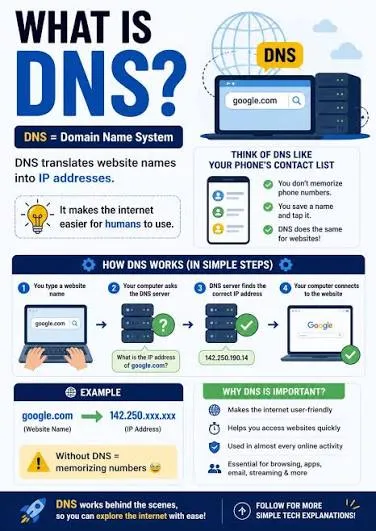
Every time someone visits your website or sends you an email, the Domain Name System (DNS) is the first thing that springs into action. DNS is often called the phone book of the internet: it translates human-readable domain names like yourcompany.com into machine-readable IP addresses like 192.0.2.42. Without DNS, there is no web, no email, and no internet as we know it.
Despite being fundamental to every online service you use, DNS is frequently misunderstood. Many website owners set it once and forget it—until something breaks. Understanding a few core DNS concepts will help you manage your domain confidently, troubleshoot issues faster, and avoid common misconfigurations that can take your site offline or leave your email vulnerable.
How DNS Resolution Works
When someone types yourcompany.com into their browser, a chain of lookups begins:
Local resolver. The browser asks the operating system, which asks the configured DNS resolver (usually your ISP or a public resolver like Google's 8.8.8.8).
Root servers. If the resolver doesn't have the answer cached, it asks one of the 13 root DNS server clusters. The root servers don't know your IP, but they know which servers handle .com.
TLD servers. The resolver asks the .com TLD (Top-Level Domain) servers for your domain. These servers point to your authoritative nameservers.
Authoritative nameservers. Finally, the resolver queries your nameservers, which return the actual DNS records for your domain.
Caching. Each step caches the result according to the TTL (Time to Live) value, so subsequent lookups are nearly instant.
This entire process typically takes less than 50 milliseconds. When it doesn't, you're dealing with a DNS problem.
Essential DNS Record Types
Every website owner should know these record types:
A Record (Address). Maps a hostname to an IPv4 address. This is the record that points yourcompany.com to your web server. Example: yourcompany.com A 192.0.2.42.
AAAA Record. The IPv6 equivalent of an A record. As IPv6 adoption grows, having AAAA records is increasingly important.
CNAME Record (Canonical Name). Creates an alias from one hostname to another. www.yourcompany.com CNAME yourcompany.com means "www is the same as the root domain." CNAMEs are useful for services where the underlying IP might change, like CDNs.
MX Record (Mail Exchanger). Tells the world where to deliver email for your domain. Each MX record has a priority number; lower numbers are tried first. Example: yourcompany.com MX 10 aspmx.l.google.com.
TXT Record. Stores arbitrary text data associated with your domain. This is where SPF, DKIM, and DMARC records live, as well as domain verification tokens for services like Google Search Console.
NS Record (Nameserver). Delegates authority for your domain to specific nameservers. These are configured at your domain registrar and tell the DNS hierarchy where to find your zone.
SOA Record (Start of Authority). Contains administrative information about your DNS zone, including the primary nameserver, the administrator's email, and timing parameters for zone transfers and caching.
TTL and DNS Propagation
TTL (Time to Live) is the duration, measured in seconds, that a DNS record should be cached before being refreshed. It's one of the most misunderstood concepts in DNS.
When you change a DNS record, the new value doesn't take effect immediately everywhere. Recursive resolvers around the world have the old value cached, and they won't check for updates until the TTL expires. This is "DNS propagation," and it's not magic—it's just caching.
Best practices for TTL:
Set long TTLs (3600 seconds or more) for stable records that rarely change, like your website's A record.
Lower TTLs (300 seconds) before planned changes, then raise them back after the change is confirmed.
For MX records, 3600 seconds is a good default because email servers retry delivery, so temporary resolution failures are less critical.
For TXT records used in domain verification, short TTLs are fine because verification is a one-time event.
DNS Security Considerations
A compromised DNS configuration can redirect your website traffic, intercept your email, or issue fraudulent TLS certificates for your domain. Here's what to protect:
Registrar account security. Use a strong, unique password and enable multi-factor authentication at your domain registrar. A single compromised registrar account can lose your entire domain.
DNSSEC. DNS Security Extensions add cryptographic signatures to DNS records, preventing attackers from injecting forged responses. We cover DNSSEC in detail in our Understanding DNSSEC article.
Lock your domain. Most registrars offer a "domain lock" or "transfer lock" that prevents unauthorized transfers. Keep this enabled unless you're actively transferring your domain.
Monitor for unauthorized changes. Use a DNS monitoring service or ScanSentinel's automated checks to detect when DNS records change unexpectedly.
How ScanSentinel Helps
ScanSentinel performs automated DNS health checks on your domain, verifying that essential records are present, correctly formatted, and following best practices. The platform checks for common misconfigurations like missing SPF records, wrongly configured MX priorities, and stale CNAME chains.
ScanSentinel also monitors DNS changes over time, alerting you when records are modified. This is critical for catching both accidental misconfigurations and potential security incidents. The DNS dashboard gives you a clear, centralized view of your domain's DNS posture.