DKIM Explained: How Email Signing Works
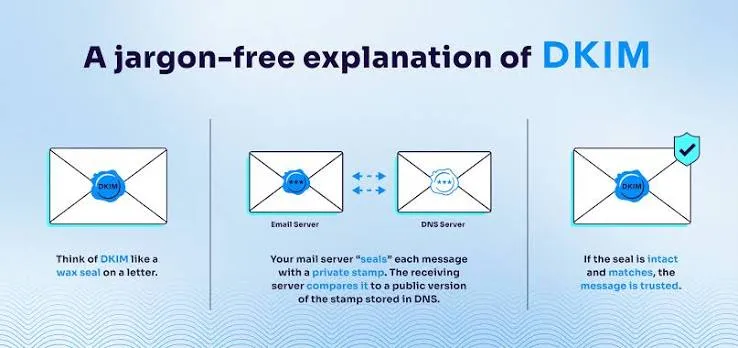
<h3>Introduction</h3><p>When you receive a letter with a wax seal, you know two things: the letter hasn't been tampered with, and it genuinely came from the person whose seal it bears. DKIM (DomainKeys Identified Mail) provides the digital equivalent for email—a cryptographic signature that proves an email was sent by an authorized sender and hasn't been modified in transit.</p><p>Unlike SPF, which checks <em>where</em> an email came from, DKIM checks <em>what</em> the email contains and <em>who</em> signed it. Together with SPF and DMARC, DKIM forms the three-legged stool of modern email authentication. Without it, your email authentication setup is incomplete.</p>
DKIM Explained: How Email Signing Works
Introduction
When you receive a letter with a wax seal, you know two things: the letter hasn't been tampered with, and it genuinely came from the person whose seal it bears. DKIM (DomainKeys Identified Mail) provides the digital equivalent for email—a cryptographic signature that proves an email was sent by an authorized sender and hasn't been modified in transit.
Unlike SPF, which checks where an email came from, DKIM checks what the email contains and who signed it. Together with SPF and DMARC, DKIM forms the three-legged stool of modern email authentication. Without it, your email authentication setup is incomplete.
How DKIM Signing Works
DKIM uses public-key cryptography. Here's the process:
Key generation. You generate a key pair: a private key that stays on your mail server and a public key that you publish in your DNS.
Signing. When your mail server sends an email, it uses the private key to create a cryptographic hash of the message headers and body. This hash becomes the DKIM signature, which is added to the email as a header.
Publication. You publish the public key as a DNS TXT record under a special hostname.
Verification. When a receiving server gets the email, it looks up your public key in DNS and uses it to verify the signature. If the signature matches, the email hasn't been altered and was signed by someone holding the private key.
The critical insight is that the private key never leaves your server. The public key can be shared freely—it only verifies signatures, it doesn't create them.
Understanding DKIM DNS Records
A DKIM public key record lives at a specific DNS hostname:
[selector]._domainkey.yourdomain.com
The selector is a name you choose (like google, mail1, or 20250601) that lets you have multiple DKIM keys for different purposes. It's like naming your keys so you know which one opens which door.
A typical DKIM DNS record looks like this:
google._domainkey.yourdomain.com TXT "v=DKIM1; k=rsa; p=MIIBIjANBgkqhkiG9w0BAQEFAAOCAQ8AMIIBCgKCAQEA..."
Breaking this down:
v=DKIM1 — DKIM protocol version
k=rsa — Key algorithm (RSA is most common; Ed25519 is newer)
p= — The base64-encoded public key
Configuring DKIM for Common Providers
Most email providers handle DKIM key management for you. Here's what configuration looks like for major platforms:
Google Workspace generates the DKIM key and gives you a DNS record to publish. You add the TXT record to your DNS, then enable signing in the Google Admin console. Google rotates keys by default, which is good security practice.
Microsoft 365 automatically signs outbound email using DKIM for your initial domain. For custom domains, you need to enable DKIM signing in the Exchange admin center and publish the CNAME records Microsoft provides.
Self-hosted email servers require you to generate keys manually using openssl, configure your MTA (like Postfix or Exim) to sign with the private key, and publish the public key in DNS.
Key Rotation and Security Best Practices
DKIM keys should be rotated periodically—at minimum once a year. If a private key is ever compromised, an attacker could sign email as your domain until you rotate the key.
Use a 2048-bit RSA key at minimum. 1024-bit keys are considered weak. Some providers now support Ed25519 keys, which are shorter and faster while providing equivalent security.
Use multiple selectors. By having both 20250601.<em>domainkey and 20250614.</em>domainkey active during a rotation, you can publish the new key in DNS, wait for DNS propagation, switch signing to the new key, and then remove the old key. This ensures zero delivery interruption during rotation.
Monitor key expiry. Some DNS providers and email platforms support key expiry tags in DKIM records. Set reminders to rotate keys before they expire.
Common DKIM Issues
DNS record too long. RSA 2048-bit public keys are around 400 characters when base64-encoded, which exceeds the 255-character limit for a single DNS TXT string. The solution is to split the value into multiple quoted strings within a single record.
Selector mismatch. The selector in the DKIM signature header must match the selector in your DNS hostname. If the signature says s=google but your DNS record is under mail1._domainkey, verification will fail.
Body modifications after signing. Some email forwarding services modify the message body (adding footers, for instance). This breaks the DKIM signature because the hash no longer matches. DMARC's alignment requirement mitigates this by allowing SPF to pass even if DKIM fails.
DNS propagation delays. When you publish a new DKIM key, allow time for DNS propagation before your mail server starts signing with it. Otherwise, receiving servers will look up a key that doesn't exist yet.
How ScanSentinel Helps
ScanSentinel automatically checks your domain's DKIM configuration by verifying that your DNS contains valid DKIM records with appropriately sized keys. The scanner detects missing selectors, weak key lengths (under 2048 bits), and expired keys. It also validates the record format and ensures the public key is properly encoded.
The Email Authentication dashboard shows DKIM status alongside SPF and DMARC, giving you a unified view of your email security posture. When problems are detected, ScanSentinel provides specific remediation guidance.